
- Off-Grid Manager Overview
- Off-Grid Manager Power Management
- Flexible and Undesired Circuits
- Off-Grid Manager Power Limit and "Measured by" Circuits
- Off-Grid Manager and CT Configuration
- Off-Grid Manager Energy Management
- Customizing Battery State of Charge Settings
Off-Grid Manager Overview
Off-Grid Manager has two functions.
- Keeping your home’s instantaneous power use (measured in watts) below a preset limit. This could be the maximum continuous output of a battery system or a generator.
- When paired with compatible batteries, Off-Grid Manager disables circuits within the home as the battery's state of charge decreases, allowing the battery to energize the remaining loads for a longer duration.
Off-Grid Manager is only available when operating off-grid. Other Controls can be configured for on-grid load management.
Off-Grid Manager Power Management
When a grid outage occurs and Off-Grid Manager activates circuits will be managed according to their categorization:
Flexible Circuits are powered by the batteries throughout the outage as long as the Power Limit is not exceeded.
Undesired Circuits are immediately shed upon a grid outage and not re-enabled until five minutes after the return of the grid.
Flexible and Undesired Circuits
How should I choose which circuits to classify as Flexible or Undesired and how should I prioritize them?
Flexible Circuits are dynamic. The circuits at the top of the flexible list have higher priority than those below. A best practice is to place loads that will automatically resume, such as thermostatic loads (HVAC, water heater, etc.) or EVs, at the bottom of the list since they will be interrupted more often, and are good at recovering. On-demand circuits that do not operate automatically (dryer, oven, etc.) should be placed towards the top of the list, since interrupting these appliances often will reset whatever cycle they were attempting or have other side effects. When idle, these circuits will use minimal power and allow the lower-priority loads to cycle on and off. When active, the higher-priority loads will operate. If not enough power remains within the Power Limit, this will force the lower-priority Flexible Circuits to be temporarily disabled if necessary. Battery-integrated systems allow Flexible Circuits to be customized to shed at a specific battery state of charge percentage during a grid outage.
Undesired Circuits are circuits you explicitly want to shed for the duration of the outage (unless overridden). Disabled circuits are not automatically resumed until five minutes after the grid outage is over. This is a good option for heavy loads that do not need to run during outages. Hot tubs and pool heaters are two examples.
How long will Flexible Circuits remain disabled?
Any disabled Flexible Circuit will remain so until there is enough available power to cover the predicted max power of that circuit. Note that there is a minimum disable time of five minutes to avoid rapid cycling of appliances.
How do I override control of a circuit?
Any disabled Flexible or Undesired Circuit can be manually re-enabled via the app by either the Home screen or Off-Grid Manager screen. However, if the Power Limit is exceeded again, the circuits will be re-disabled in ascending order. If you want one Flexible Circuit to take precedence over other Flexible Circuits, you can reorder the circuit to be higher on the list.
Off-Grid Manager Power Limit and "Measured by" Circuits
What is the Off-Grid Manager Power Limit?
The Power Limit can be set by the installer or the owner of the system by selecting the pencil icon at the top of the Off-Grid Manager page, then select the "Maintain power limit of" card in the "I want to" section. Here you can enter the maximum allowable power consumption in watts (the Power Limit). If power on the "Measured by" Circuit(s) exceeds the Power Limit, Off-Grid Manager will disable Flexible Circuits in ascending order. Typically, the Power Limit should be set at or slightly less than the maximum continuous power output capacity of either the inverter or the battery, whichever is less (typically the battery-based inverter). Please note that in some systems, such as the Tesla Powerwall , the battery and the battery-based inverter are packaged together in a single enclosure that system owners likely think of simply as their “battery”. In these cases, there will be only one continuous power output rating provided by the manufacturer.
In addition to continuous output capacity, all leading inverters also have a surge output capacity so that a total load greater than the continuous output capacity can be powered for a short time as motors and compressors start. To accommodate this, Off-Grid Manager will allow the "Measured by" Circuit(s) to draw as much as 125% of the Power Limit for two seconds. The amount of surge allowance and the duration in seconds will be adjustable in future updates to Off-Grid Manager.
Off-Grid Manager Power Limit Example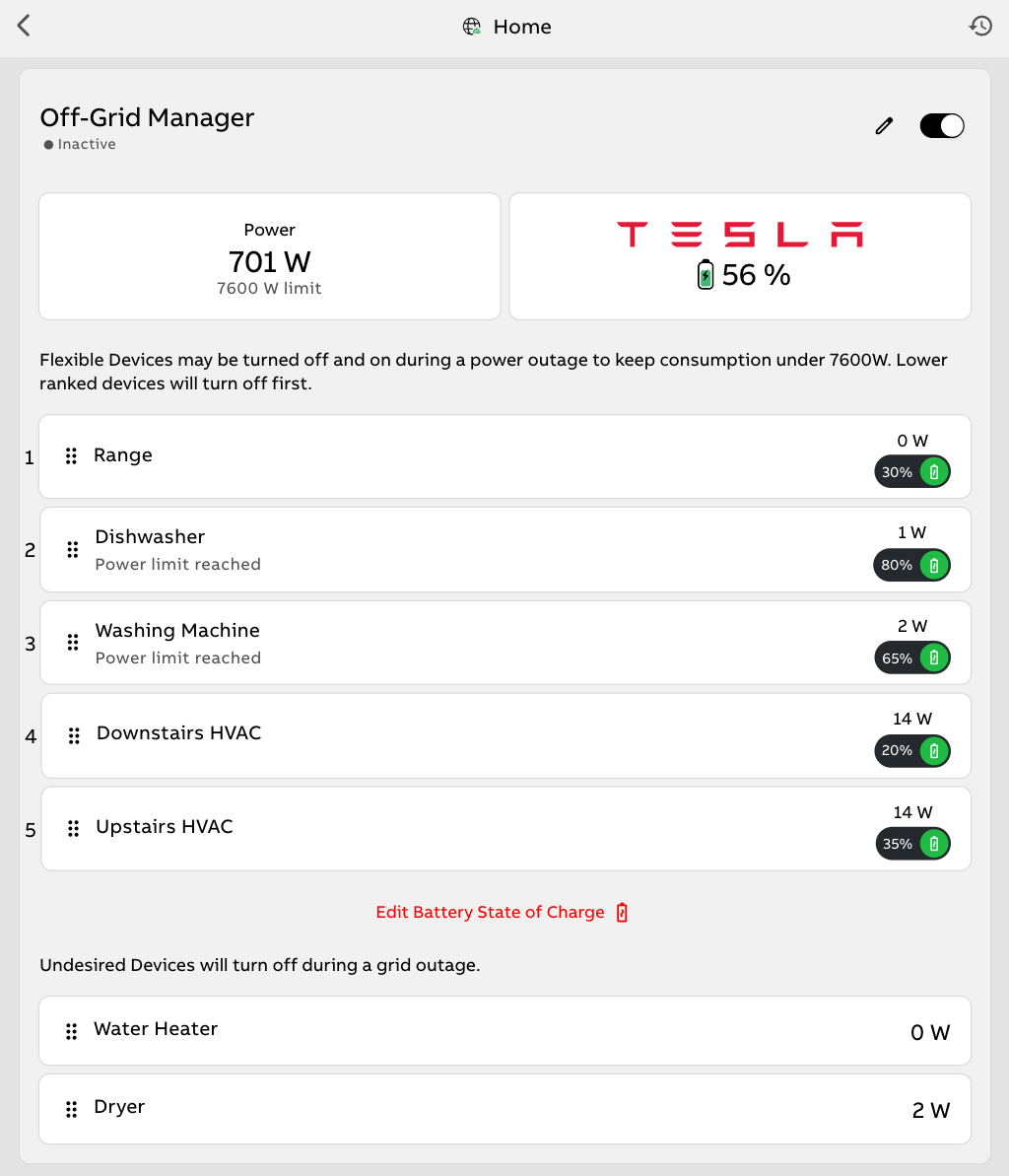
By setting the off-grid Off-Grid Manager Power Limit to match inverter or battery maximum discharge limits, a larger number of circuits can be available off-grid without risk of tripping the inverter or damaging the battery. When the Power Limit is reached, Flexible Circuits will be shed in ascending order (bottom of list to top) until power demand is once again safely below the limit. When power demand is safely below the Power Limits, Flexible Circuits will be re-enabled in descending order (top to bottom) as long as each circuit’s predicted needs can be met by the available power supply. Five minutes after the grid is restored, Off-Grid Manager will return all circuits to their original pre-outage state.
What are "Measured by" circuits?
"Measured by" Circuits are the circuits Lumin monitors and compares to the Power Limits. For most installations, the "Measured by" Circuit(s) should be the circuit(s) that delivers battery power to the load center/electrical panel that Lumin controls. Off-Grid Manager will sum up measurements from any circuit(s) designated as a "Measured by" Circuit and compare that instantaneous total power reading to the Power Limits. Note that in some cases where the "Measured by" Circuit set contains both PV and battery output, this limit will be extra conservative from a battery/inverter protection perspective, as some of the measured power could be coming from solar and not straining the battery inverter's output capacity.
Do I have to choose "Measured by" circuits and Power Limits?
Yes. To ensure that your Lumin Smart Panel functions well, we require that a Power Limit and at least one "Measured by" Circuit are selected during the setup process. This allows Lumin to manage the connected load and ensure it does not exceed the Power Limit.
Which circuits should I choose as "Measured by" circuits?
Choosing the correct "Measured by" circuits is crucial for proper operation. In general, only your CTs should be selected as "Measured by" circuits. See the CT configurations below for more information. Only if no CTs are installed and all circuits in the load center are controlled by Lumin should you choose all controlled circuits as "Measured by" circuits.
Off-Grid Manager and CT Configuration
How should CTs be configured for proper Off-Grid Manager operation?
Lumin CT configuration depends on the type of energy storage system and several other factors. The following are several basic configurations that will work properly with Off-Grid Manager:
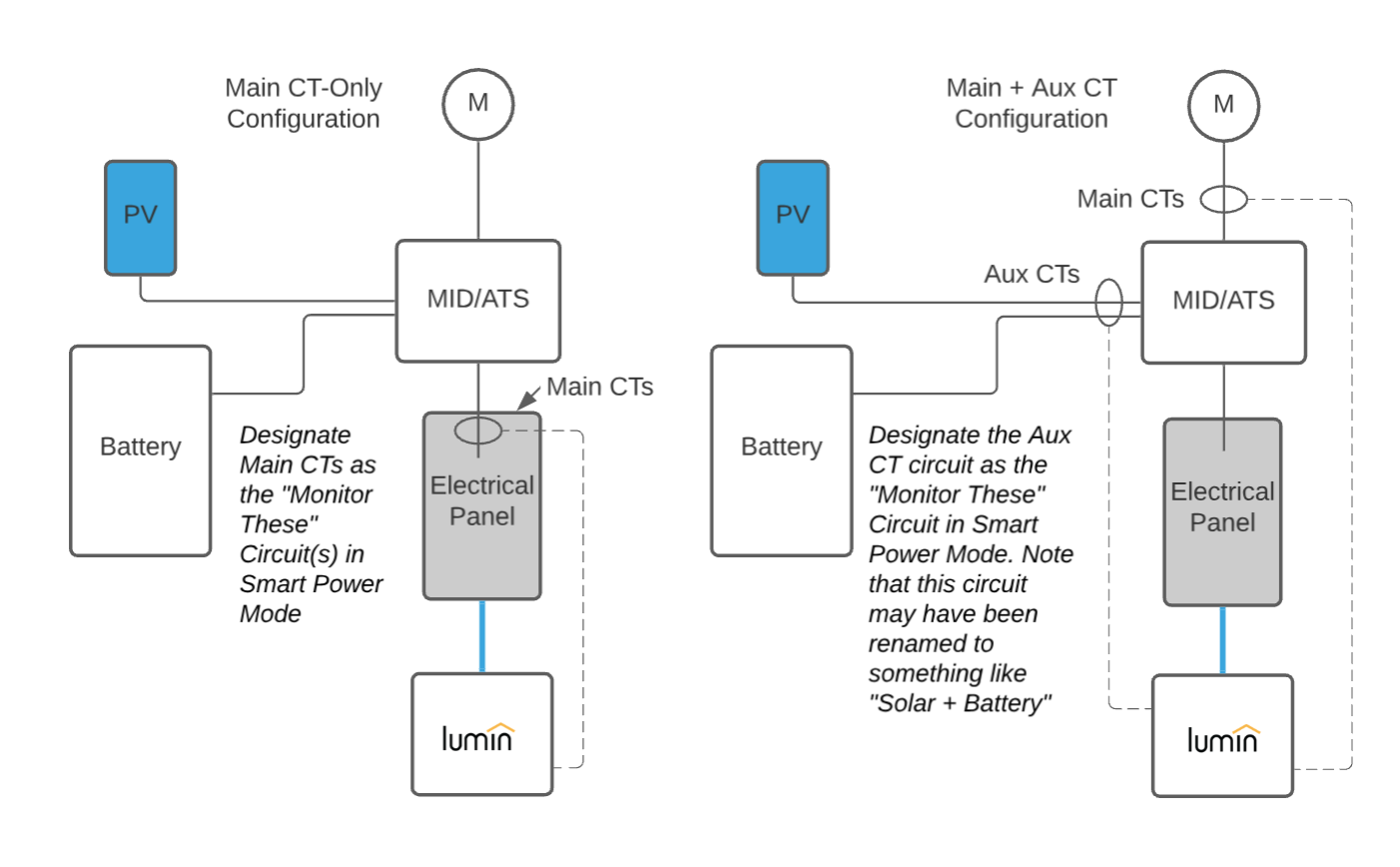
- Main CT-Only Configuration
- Designate Main CTs as the "Measured by" Circuit(s) in Off-Grid Manager.
- Main + Aux CT Configuration
- Designate the Aux CT circuit as the "Measured by" Circuit(s) in Off-Grid Manager.
- Note that this circuit may have been renamed to something like "Solar + Battery".
- Designate the Aux CT circuit as the "Measured by" Circuit(s) in Off-Grid Manager.
If your installation does not resemble the drawings above, please see the following article for more information:
Further advice on proper CT placement and special configurations is available by contacting Lumin support at 888-421-0616 or support@luminsmart.com.
How does Off-Grid Manager work if there is more than one Lumin Smart Panel at my location?
Off-Grid Manager runs independently on each Lumin Smart Panel and can only interact with the circuits (both Monitor and Control) measured by that Lumin Smart Panel. When more than one Lumin Smart Panel is installed at a location, all Lumin Smart Panels will be triggered by the same off-grid event detected by a single Grid Detection Circuit (GDC) branching off to each Lumin Smart Panel. Within the Lumin app, there will be one Off-Grid Manager per Lumin Smart Panel installed at the location, and each Off-Grid Manager instance will only control one Lumin Smart Panel.
Note that each Lumin Smart Panel that runs Off-Grid Manager requires a dedicated "Measured by" Circuit, or set of "Measured by" Circuits. This may mean that CTs from multiple Lumin Smart Panels are clamped on the same wires.
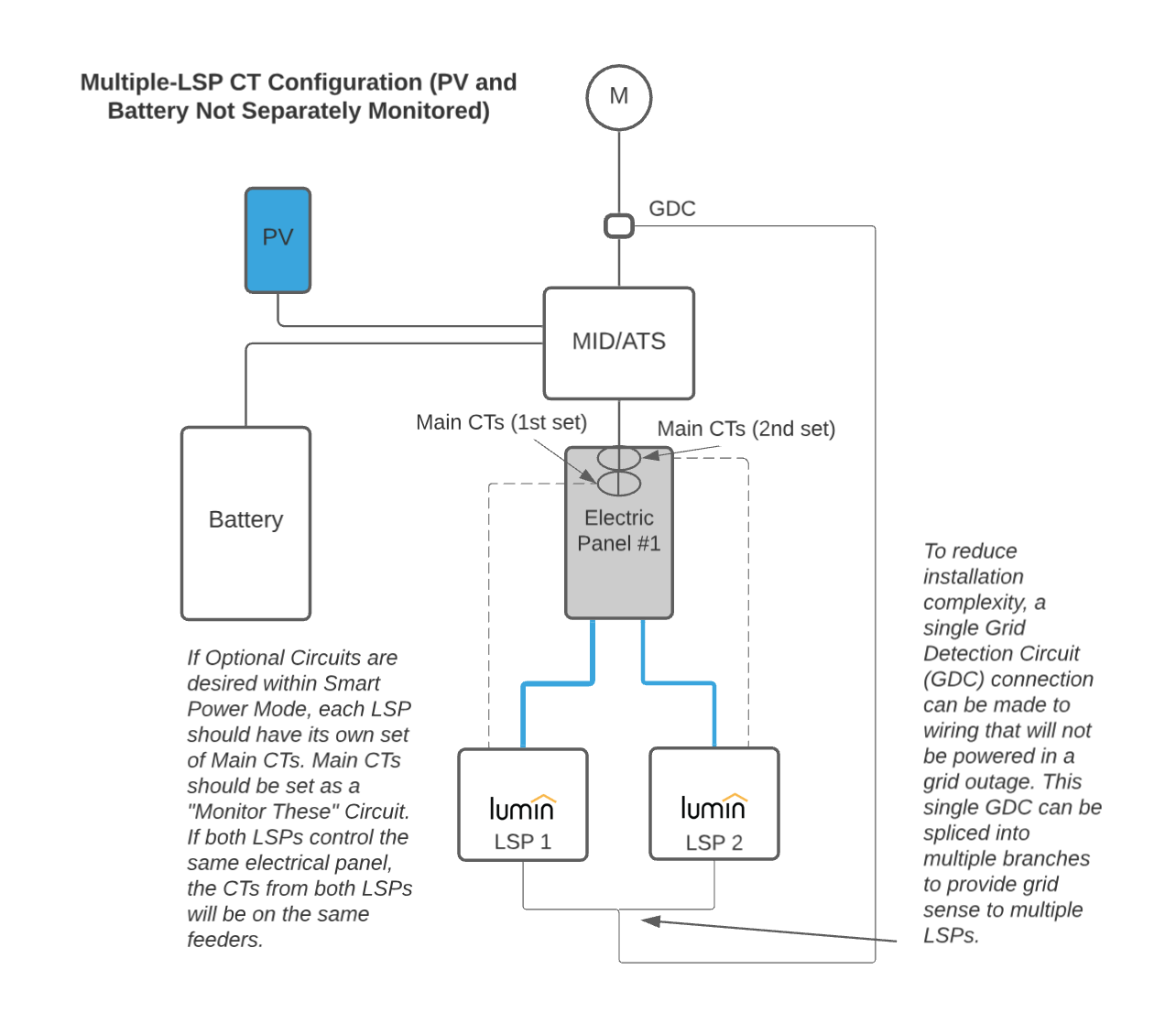
In a multiple-LSP CT configuration (PV and battery not separately monitored):
- If Flexible Circuits are desired within Off-Grid Manager, each Lumin Smart Panel should have its own set of Main CTs. Main CTs should be set as a "Measured by" Circuit. If both Lumin Smart Panels control the same electrical panel, the CTs from both Lumin Smart Panels will be on the same feeders.
- To reduce installation complexity, a single GDC connection can be made to wiring that will not be powered in a grid outage. This single GDC can be spliced into multiple branches to provide grid sense to multiple Lumin Smart Panels.
Off-Grid Manager Energy Management
Lumin's energy management feature prolongs the runtime of your home's battery in a grid outage by shedding Flexible Circuits as your battery discharges past the state-of-charge setpoint and re-enabling those circuits as the state of charge increases beyond the setpoint.
This feature requires information about the battery's state of charge, which is accessed via an API request to the storage system. Not all battery manufacturers publish an API that is accessible to third-party platforms, so this feature is restricted to those systems that do. See the list below for storage brands that currently offer this feature:
- SolarEdge
- EG4
- Tesla
A battery integration will need to be configured for your location before this functionality can be used. There are two ways to add a battery integration:
- Option 1: Go to Settings > System > Devices & Integrations > Battery Integration
- Option 2: Go to Controls > Off-Grid Manager > Add Battery
Select the battery brand and follow the on-screen prompts to integrate the battery state of charge with Lumin. This process will normally require access to the battery or inverter monitoring account.
For more information on battery integrations, see:
Customizing Battery State of Charge Settings
To edit the battery state of charge percentage at which an Flexible Circuit sheds:
| 1. Go to Controls > Off-Grid Manager. | 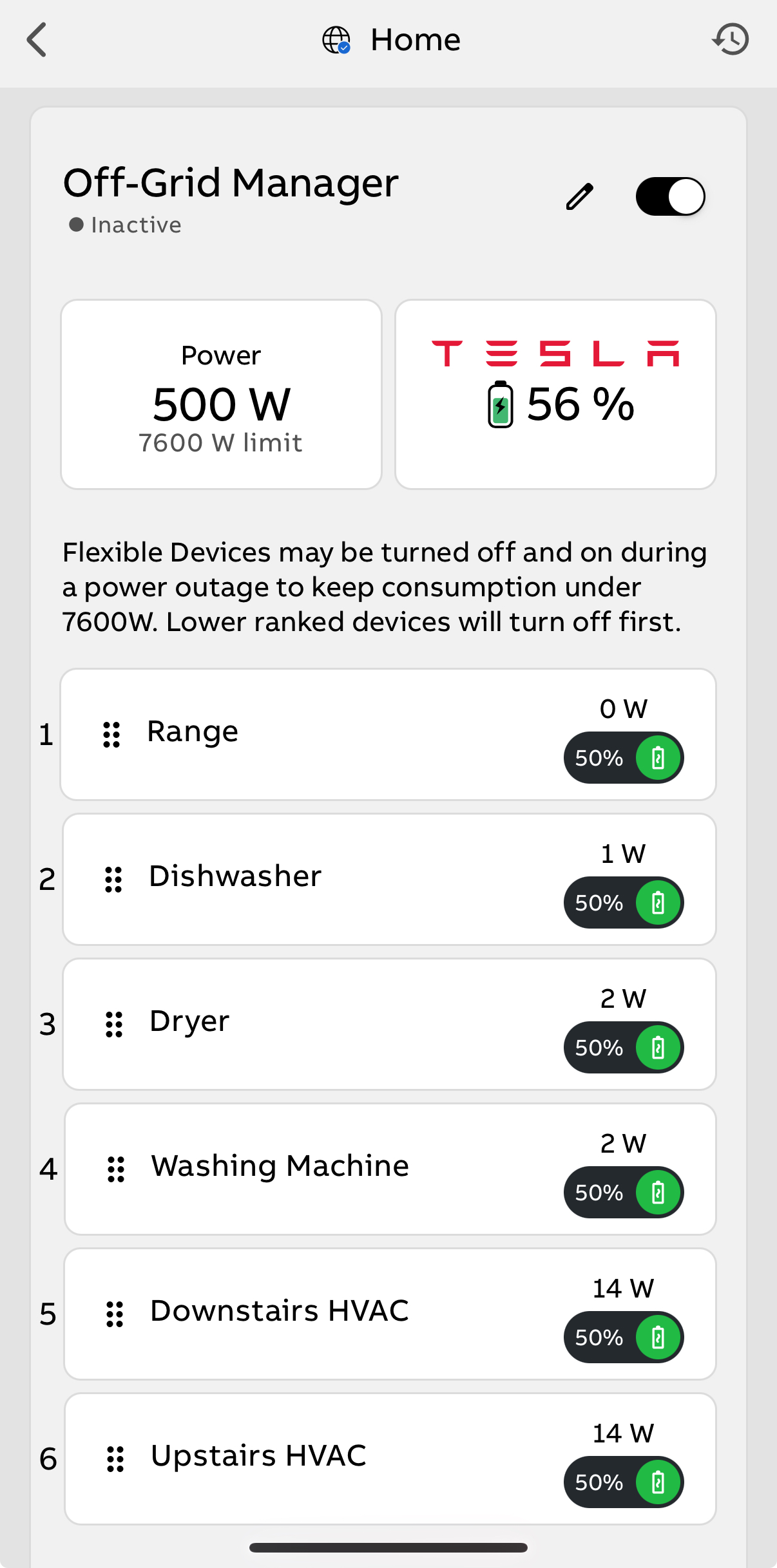 |
| 2. Scroll to the bottom of the list of Flexible devices, select "Edit Battery State of Charge". | 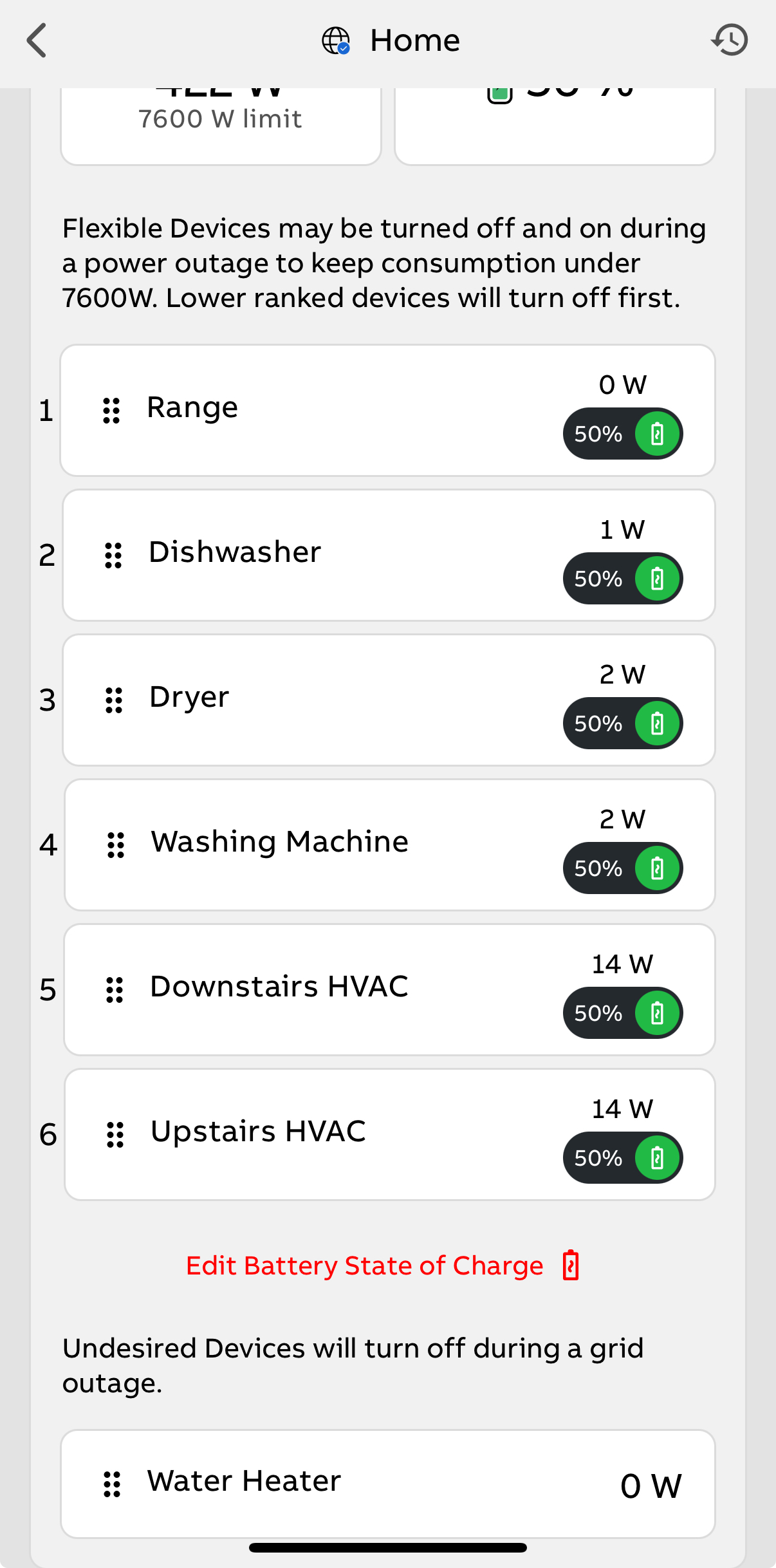 |
| 3. Adjust the slider to the desired percentage for each device. NOTE: The maximum allowable percentage is 95%. 4. Select Done at the bottom of the screen. The Flexible devices will update to the new percentages. They will shed at this percentage as the state of charge decreases, and it will be re-enabled when the state of charge reaches 5% greater than the shed threshold. | 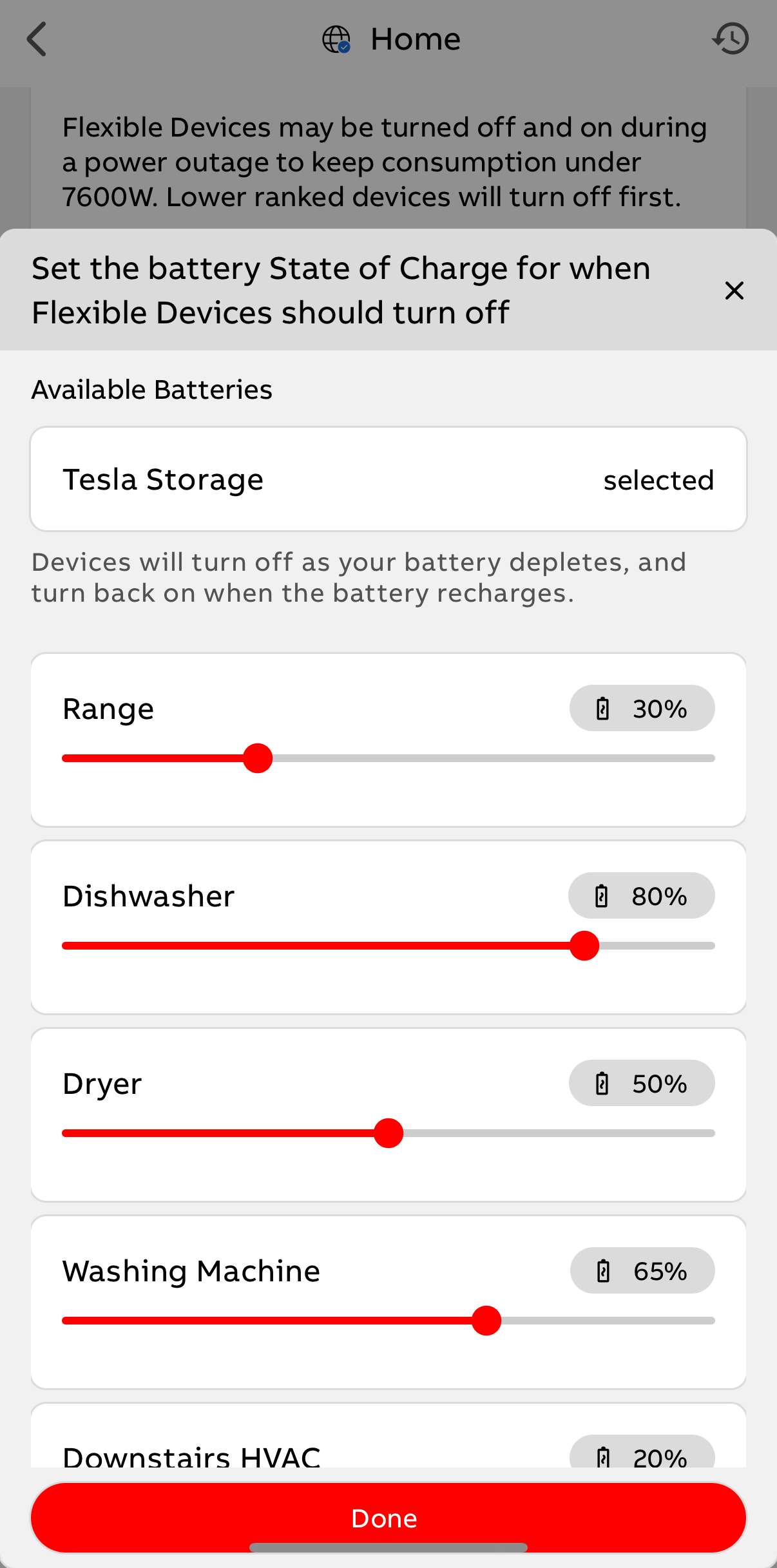 |
If you have additional questions about Off-Grid Manager, please contact support@luminsmart.com or call us at 888-421-0616.
